




Frequently Asked Questions
- General
- Pricing
- Sign Up and Account Set up
- Data Import/Synchronization from Files, Databases and Applications
- Data Modeling
- Sharing, Collaboration, Publishing and Export
- Integration With Other Zoho Services
- Integration with External Services
- API
- Rebranding, White labeling, and ISV integration
- Help & Support
- Others
General
- What is Zoho Analytics?
- Who should use Zoho Analytics?
- What is the difference between Spreadsheets and Zoho Analytics?
- What type of reports can be created in Zoho Analytics?
- Does Zoho Analytics support creating Dashboards?
- What are the other Zoho products integrated with Zoho Analytics?
- Can Zoho Analytics be used as an Online Database?
- What are the browsers supported by Zoho Analytics?
- What is the best-viewed screen resolution for Zoho Analytics?
- What are the languages supported by Zoho Analytics User Interface?
- How do I change the language of my Zoho Analytics User Interface?
- How secure is my data in Zoho Analytics service?
- What are the security and privacy policies of Zoho?
1. What is Zoho Analytics?
Zoho Analytics is an on-demand reporting and business intelligence solution that helps you get new insights on your business information through its powerful and flexible online business intelligence engine. You get powerful reports in minutes, with no IT help.
Zoho Analytics offers the following important capabilities:
Also watch the Video on Zoho Analytics Overview
- Complete Online Reporting & Business Intelligence service accessible anytime and anywhere!
- Easy to adopt 'Spreadsheet-like' interface with powerful drag & drop based reporting features for quick report creation.
- Supports a wide range of reporting capabilities like Dashboards, Charts, Pivot Tables, Summary Views and simple Tabular reports. Supports creation of KPI widgets in dashboards to track key performance metrics.
- Supports data import from a variety of file formats like Excel, JSON, HTML etc. Also, supports data import from cloud storage and Web URLs. Supports periodic scheduling of import.
- Integrated with 10+ Zoho products such as Zoho CRM, Zoho Projects, Zoho Books, Zoho BugTracker, Zoho Recruit etc.
- Zoho Analytics is integrated with 25 + popular business applications like Google Analytics, Salesforce CRM, QuickBooks, Zendesk etc.
- You can also integrate your own applications with Zoho Analytics using Zoho Analytics API.
- Integrated with Zapier to power up import from over 500+ apps.
- Blend & merge data from across different sources to create meaningful business reports
- With an advanced formula engine, you can derive key business metrics from your data. Also, supports SQL (Structured Query Language) driven querying for powerful report creation.
- Real-time collaboration by sharing data and reports in read or read-write modes with your colleagues & friends.
- Export and Print reports in a variety of formats. Notify reports via email.
- Publish reports for wider consumption Embed reports within your websites, web applications and blogs.
- Highly secure through user login with support for HTTPS (SSL connection). All your data and reports are hosted in highly secure data centers. (Refer Security and Privacy)
- Supports Logo Rebranding and White labeling solutions.
2. Who should use Zoho Analytics?
Zoho Analytics can be used across various functional areas and by a wide range of users for their reporting and analytical needs. Read more about who can benefit from Zoho Analytics. Follow this link for a detailed discussion on Who should use Zoho Analytics?
3. What is the difference between Spreadsheets and Zoho Analytics?
You can read about the difference between Spreadsheet and Zoho Analytics in our solutions page - Comparison with Excel Reporting.
4. What type of reports can be created in Zoho Analytics?
Zoho Analytics supports a wide variety of report creation options, which includes:
- Charts: Allows you to create 25+ chart types.
- Pivot Tables: Allows you to create a powerful view with data summarized in a grid both in horizontal and vertical columns (also known as Matrix Views).
- Tabular Views: Allows you to create simple table views with column grouping and sub-totals (aggregation).
- Summary View: Allows you to create a view with summarized values and grouping.
- Dashboards: Allows you to create dashboards consisting of multiple reports (along with formatted text & images) in a single page format. Dashboards provide you a quick, at-a-glance view of your key business information for easy analysis and visualization.
5. Does Zoho Analytics support creating Dashboards?
Yes, Zoho Analytics does support dashboard creation. Zoho Analytics provides an easy to use drag and drop interface for creating custom dashboards in minutes. Using the dashboard you can display a collection of reports in a single page, providing a quick at-a-glance view of your Key Business Information for easy analysis & visualization. For more details, refer this help documentation.
6. What are the other Zoho products integrated with Zoho Analytics?
Currently, Zoho Analytics is integrated with Zoho CRM, Zoho Recruit, Zoho BugTracker, Zoho Projects and Zoho Creator. We also offer integration with Manageengine ServiceDesk Plus and Manageengine SupportCenter Plus. We are also planning on providing integrations with other Zoho Services like Zoho Books, Zoho Survey, Zoho Invoice etc in the future.
7. Can Zoho Analytics be used as an Online Database?
Zoho Analytics is an Online Reporting and Business Intelligence service, therefore yes it can be used as an online database. The features offered by Zoho Analytics specialize on providing an in-depth - powerful and flexible reporting capabilities. It contains an in-built analytical database grid, which is optimized for reporting and querying more than just serving as a real-time online transactional database.
The following links will be a useful read:
8. What are the browsers supported by Zoho Analytics?
Zoho Analytics supports the following browsers:
- Google Chrome - Latest 3 versions
- Firefox - Latest 3 versions
- Safari - Latest 3 versions
- Microsoft Edge - Latest version
The above browsers have been tested in the following platforms:
- Windows XP, Windows Vista, Windows 7, Windows 8 and Windows 10
- Mac OS
- Ubuntu and Linux OS
9. What is the best-viewed screen resolution for Zoho Analytics?
Zoho Analytics is best viewed in 1280 * 720 screen resolution and above.
10. What are the languages supported by Zoho Analytics User Interface?
Zoho Analytics user interface is available in 15 different languages.
- English
- French[fr]
- German[de]
- Spanish[es]
- Dutch[nl]
- Portuguese[br]
- Swedish[sv]
- Turkish[tr]
- Russian[ru]
- Portuguese[pt]
- Italian[it]
- Korean[ko]
- Danish[da]
- Polish[pl]
- Ukranian[uk]
- Vietnamies[vi]
- Arabic
- Hungarian[hu]
- Bulgarian
- Chinese (Traditional)
- Croatian
- Czech
- Hebrew
- Hindi[hi]
- Indonesian (Bahasa Indonesia)
- Thai
- Malay
- Japanese
- Chinese
We are working to support more languages.
11. How do I change the language of my Zoho Analytics User Interface?
The Zoho Analytics User interface language selection is based on the locale setting in the user`s browser. In case you have a different language setting in your browser, you can change it from the Zoho Accounts page. You may have to wait for 10 minutes, or logout and login again, for the language change to effect in the user interface.
12. How secure is my data in Zoho Analytics service?
In Zoho we give utmost importance to ensure our customers' data is both Safe and Secure. We have very stringent processes and systems in place to ensure the same. To know more about this, we recommend you to go through the following policy documents:
Zoho Security Practices & Policies: https://www.zoho.com/security.html
Zoho Security Practices An Overview: https://www.zoho.com/trust.html
Zoho Privacy Policy: https://www.zoho.com/privacy.html
Zoho Terms of Service: https://www.zoho.com/terms.html
In case you have any further questions or concerns, please write to us at support@zohoanalytics.com.
13. What are the security and privacy policies of Zoho?
You can view our Security and Privacy policies from the links given below:
Zoho Security Practices & Policies: https://www.zoho.com/security.html
Zoho Privacy Policy: https://www.zoho.com/privacy.html
Pricing
- How much does Zoho Analytics cost?
- Do you offer free version of Zoho Analytics?
- Why should I go for priced plans? What are the benefits in using the priced service?
- How do you define a "User" by Zoho Analytics Pricing model?
- How is the "Number of rows" stored counted?
- Who is defined as the "Account Administrator"?
- Will I get Technical Support as part of my subscription?
- Do you offer bulk pricing packages (with users and rows)?
- Can I change my credit card details? If yes, how can I do this?
- Where can I get more details about Zoho Analytics pricing?
1. How much does Zoho Analytics cost?
The pricing for Zoho Analytics starts at /month. Zoho Analytics also offers a Free Plan ($0) targeted at small end reporting requirements. It supports 2 users, 5 Workspaces and 10,000 rows in your account.
We also offer bulk pricing packages to suit your needs. Please write to sales@zohocorp.com with your exact requirements. We'll get back to you with a price quote. You can find more details about the various pricing plans offered by visiting https://www.zoho.com/analytics/pricing.html
2. Do you offer free version of Zoho Analytics?
Yes, Zoho Analytics offers a forever Free Plan ($0) targeted at small end reporting requirements. It supports 2 users, 5 Workspaces and 10,000 rows in your account. You can find more details about the various plans Zoho Analytics offers, by visiting https://www.zoho.com/analytics/pricing.html
3. Why should I go for priced plans? What are the benefits in using the priced service?
The priced plans allow you to store more data (more number of rows) and share the views in Zoho Analytics with more number of users based on your plan. Also, it offers a wide range of value added features, which include:
- Unlimited Number of Workspaces
- Unlimited Scheduled Data Imports from Web URLs (website links)
- Emailing Reports
- Unlimited Number of SQL Query Tables
- Multiple Workspace Administrators support enabling the Administrator to add multiple users as Workspace Administrators for the Workspace. Workspace Administrators inherit all the privileges in the Workspace as that of the Administrator, except for the permission to rename, delete and backup the Workspace.
- Backup support enabling the Administrator to periodically backup of your data in the Zoho Analytics Workspace.
- Logo re-branding support to add custom logo in your account. You can also customize the Powered By Zoho Analytics logo/message while embedding reports.
- And many more...
4. How do you define a "User" by Zoho Analytics Pricing model?
Anyone to whom at least one view in the Zoho Analytics account is privately shared is considered a User in the Zoho Analytics pricing model. These private users are required to have an account in Zoho Analytics and they need to login with their user name and password to access the views shared to them in that corresponding Zoho Analytics account. Users are identified by their unique email address, to which the views in Zoho Analytics account is shared.
Account Administrator is also considered as a User. When you subscribe a plan with 5 users, then you an privately share the data/reports in your account with 4 other persons for collaboration. Now your Zoho Analytics account is said to have 5 users (Admin + 4 users).
By adding new users to your account, you could easily collaborate with them. The Administrator has the complete control on who can access the views. The administrator can grant permission to perform operations such as add, modify and delete data, create new reports and share views within a group, apart from just viewing the shared reports. Shared users will be able to perform only the operation that the admin has granted.
5. How is the "Number of rows" stored counted?
The number of rows (records) is the sum of all rows stored across all your workspace in your Zoho Analytics account. i.e., when you have 2 workspaces with 3 tables in each of them. And each table contains 100,000 rows. Then the total number of rows in your Zoho Analytics account is calculated as 600,000 (100,000 rows * 6 tables).
Note
- Rows that are stored in Zoho Analytics Tables (across all your workspaces) alone will be counted. Data in any other object in Zoho Analytics such as query table and tabular view will not be counted.
6. Who is defined as the "Account Administrator"?
An Account Administrator is the one who subscribes to the Zoho Analytics account. The Admin has authority to perform all possible operations available. This includes:
- Add and delete Workspaces
- Add, modify and delete data
- Create, modify and delete Reports & Dashboards
- Add and delete Users and Workspace Administrators
- Share Reports and Data to Users
- Upgrade or downgrade Zoho Analytics account
- And much more...
7. Will I get Technical Support as part of my subscription?
Yes, we offer technical support to all our customers. And we do not charge any fees other than the monthly subscription. We do prioritize our paid users request and ensure that it is responded within 24hrs. You can avail technical support through any of the following means:
- Email us at support@zohoanalytics.com
- You can also reach out to us on our toll free numbers
- United States: +1 (888) 900 9646
- United Kingdom: +44 (20) 35647890
- Australia: +61-2-80662898
- India: +91-44-67447000
- Post your queries in our user community forum
For more details about support, refer to the Help & Support section.
8. Do you offer bulk pricing packages (with users and rows)?
Yes, we do. Please write to sales@zohocorp.com with your exact requirements. We'll get back to you with a price quote.
9. Can I change my credit card details? If yes, how can I do this?
Yes, you can change your credit card details setup for your account. To know how to change credit card details, refer to the Zoho Payments document.
10. Where can I get more details about Zoho Analytics pricing?
You can find more details about the various pricing plans at http://zohopayments.wiki.zoho.com/Zoho-Reports.html
Sign Up and Account Set up
- How to sign up an account for Zoho Analytics?
- How to modify my account settings?
- How to change/reset my password?
- Can I add multiple Email ID's for my account?
- Is it possible to change my primary Email ID?
- Where can I get more details about My Account setup?
1. How to sign up an account for Zoho Analytics?
You can create a Zoho Analytics account in less than sixty seconds by just filling up the Sign Up form.
2. How to modify my account settings?
You can change your account setting by following the steps given below:
- Login to Zoho Analytics.
- Click the drop-down menu displayed with your user name at the top right corner.
- Click Account Setting menu item, this will open Zoho Accounts Profile page (You can also directly access/open this page using direct link https://accounts.zoho.com.
- Navigate to the Settings tab.
- Customize/Modify your account settings as required.
3. How to change/reset my password?
You can change your password by following the steps given below:
- Login to Zoho Analytics.
- Click the drop-down menu displayed with your user name at the top right corner.
- Click Account Setting menu item, this will open Zoho Accounts Profile page (You can also directly access/open this page using direct link https://accounts.zoho.com.
- Click Security > Change Password.
- Enter the current password for confirmation.
- Enter the new password twice and then click Save.
- Your password will be changed.
4. Can I add multiple Email ID's for my account?
Yes, Zoho Analytics allows you to add multiple Email ID's to your account.
Note:
- Only one email id will be considered as Primary to your account and all other mail ids added will be considered as secondary mail id's.
To add a secondary email id:
- Login to Zoho Analytics.
- Click the drop-down menu displayed with your user name at the top right corner.
- Click Account Setting menu item, this will open Zoho Accounts Profile page (You can also directly access/open this page using direct link https://accounts.zoho.com.
- Click My Profile info > Email Address link.
- In the My Email Address screen, click Add New Email button.
- Enter a new email address and your current password in the corresponding text boxes and then click Add.
- A confirmation mail will be sent to your new email address. You can also resend the mail by clicking the Resend Confirmation Mail.
- Confirm the mail id following the steps provided in the confirmation mail. Now the new email id will be added as your secondary email address.
5. Is it possible to change my primary Email ID?
Yes, you can change your primary email id and set one of your secondary email id as primary.
To change primary email id:
- Login to Zoho Analytics.
- Click the drop-down menu displayed with your user name at the top right corner.
- Click Account Setting menu item, this will open Zoho Accounts Profile page (You can also directly access/open this page using direct link https://accounts.zoho.com.
- Add a secondary email id as stated in the previous question.
- Click Make Primary link adjacent to the secondary email id which you want to set as primary id.
- Enter your account password and then click the Make Primary button.
- A confirmation mail will be sent to your new email address. You can also resend the mail by clicking the Resend Confirmation Mail.
- Confirm the mail id following the steps provided in the confirmation mail. Now the secondary email id will be set as the primary address of your account. The old email id will be set as secondary mail id.
- In case you want to remove the old email id, then click the Remove link adjacent to the email id to delete it.
6. Where can I get more details about My Account setup?
You can get more details about your account setup in the following link - https://zohosso.wiki.zoho.com
Data Import/Synchronization from Files, Databases and Applications
- What are the file formats from which you can import data into Zoho Analytics?
- Any restriction on the size of data files that could be imported from the user interface?
- How to upload large data files into Zoho Analytics?
- How to upload/push data files from in-house and hosted applications into Zoho Analytics?
- How to upload data from local databases like Oracle, SQL Server, MySQL, DB2, PostgreSQL, MS Access etc., to Zoho Analytics?
- How to upload/push/import data periodically into Zoho Analytics?
- Do you offer APIs to import/upload data into Zoho Analytics?
- Can I add data directly into Zoho Analytics?
1. What are the file formats from which you can import data into Zoho Analytics?
You can import tabular data from the following file formats:
- Excel Spreadsheets (.xls)
- CSV (Comma Separated Values)
- TSV (Tab Separated Values)
- Any tabular data in text file format
- HTML files MS Access (.mdb)
- files Web URLs which generates data in CSV or Excel format
- Google Spreadsheets from Google Drive
- Zipped files in any of the above file formats (except .mdb files)
You can also copy-paste data from all the above file formats as well as from spreadsheets (Microsoft Office Excel, Open Office Calc and StarOffice) files to import the data into Zoho Analytics. For more details, refer to Import Data section.
2. Any restriction on the size of data files that could be imported from the user interface?
Currently, Zoho Analytics allows you to import files (CSV, TSV, XLS, HTML) with maximum 1000,000 rows or a file size limit of 100 MB at a time when you use the Zoho Analytics web user interface. It will restrict it based on whichever condition is met first. If you wish to upload more than 1000,000 rows or a file more than 100 MB at a time, you can use the Zoho Databridge, as it would be more efficient to handle such loads.
For free and trial versions, Zoho Analytics allows you to have only up to a maximum of 1000,000 rows in a table.
If you find these limits are constraining to your application needs, mail us your requirements to support@zohoanalytics.com, we will definitely help you.
3. How to upload large data files into Zoho Analytics?
You can import data up to 100 MB or 1000,000 rows into Zoho Analytics without any issues. Importing huge files (exceeding the said limit) might fail. As the upload happens over the Internet, slow or unreliable network connection might cause failures or interrupt the large data upload.
To avoid this, we recommend using Zoho Databridge, a lightweight independent utility that bridges your data source and Zoho Analytics server to enable easy data import. This provides a hassle-free import of large CSV files.
Note: the overall limitation of having a maximum 1,000,000 rows in a table still applies, when you are in the Free or Trial Editions of Zoho Analytics. Please refer #2 for more details on import data size restrictions.
4. How to upload/push data files from in-house and hosted applications into Zoho Analytics?
You can upload/push data files from in-house and hosted applications into Zoho Analytics. For details, refer to the solution page How to upload/push data from in-house applications.
5. How to upload data from local databases like Oracle, SQL Server, MySQL, DB2, PostgreSQL, MS Access etc., to Zoho Analytics?
You can upload data from local databases like Oracle, SQL Server, MySQL, DB2, PostgreSQL, MS Access etc., to Zoho Analytics. For details, refer to the following sections:
- Pushing Data Directly from In-house Databases behind Firewall
- Zoho Analytics: Connectors for Oracle, SQL Server, MySQL, PostgreSQL, DB2 and MS Access Databases.
6. How to upload/push/import data periodically into Zoho Analytics?
You can periodically upload/push/import data into Zoho Analytics through any of the following supported means:
- Setup periodic import of data available from Web URLs. Read for more details.
- Use CSV Upload tool and setup periodic data upload schedules from local databases or CSV files. Read for more details.
- Use Zoho Analytics API and push data from your applications as and when data changes or as bulk. Read for more details.
7. Do you offer APIs to import/upload data into Zoho Analytics?
Yes, we do offer comprehensive HTTP based Web APIs to import/upload data into Zoho Analytics. For more details refer to Import Data API section in Zoho Analytics API document.
8. Can I add data directly into Zoho Analytics?
Yes, you can enter data directly into Zoho Analytics table as you enter data in an Excel sheet. To know how to add data in a table, refer to the Add Rows and Columns section. You can also create a table by directly entering data. For details, refer to Enter Data Right Away section.
Data Modeling
- Does Zoho Analytics support Relational modeling?
- Can I join tables/datasets to create reports in Zoho Analytics?
- Does Zoho Analytics support SQL (Structured Query Language) Querying?
- What are the SQL Dialects supported by Zoho Analytics?
1. Does Zoho Analytics support Relational modeling?
Yes, Zoho Analytics supports relational modeling of your Workspace. The following are the important capabilities that are currently available:
- You can create tables which have lookup columns between them. This helps you to create parent-child relationships and enable to automatically join data tables for creating reports.
- With lookup columns you can define familiar models like Star Schema & Snow-flake Schema which are optimized for reporting and analysis.
- Zoho Analytics supports cascade-on-delete i.e., when you delete a row in the parent table, it will automatically delete the corresponding rows in the child table(s). This setting is optional.
- You can easily join tables to create reports in any of the following models:
2. Can I join tables/datasets to create reports in Zoho Analytics?
Yes, you can join data tables and easily create reports in Zoho Analytics. There are two way to join tables. They are by Auto join and by Query tables.
You can auto join tables using lookup columns and then create reports over these tables. For more details on this refer to the following link:
Help Document: https://www.zoho.com/analytics/help/table/joining-tables.html#defining-lookup
Using Query tables you can join data from multiple tables in a database using JOIN construct in SQL SELECT query. You can save the results from the query into a new table for creating reports over the same. For more details, refer to the following link:
Help Document: https://www.zoho.com//analytics/help/table/joining-tables.html#joining-tables-with-query-tables
3. Does Zoho Analytics support SQL (Structured Query Language) Querying?
Yes, Zoho Analytics supports full-fledged SQL based querying of your workspace. It understands SQL SELECT Queries written in any of the well-known database dialects including Oracle, Microsoft SQL Server, IBM DB2, Sybase, MySQL, PostgreSQL, Informix and ANSI SQL.
You can use SQLs from any of the below methods:
- From the Zoho Analytics User Interface, create Query Tables to execute SQL SELECT queries in Zoho Analytics. You can then generate reports over the Query Table created. Watch this Video on how to Create Query Tables.
- Use Zoho CloudSQL API to execute SQL SELECT queries on Zoho Analytics. You could use Zoho CloudSQL API when you want to integrate Zoho Analytics within your own applications.
4. What are the SQL Dialects supported by Zoho Analytics?
Zoho Analytics supports SQL written in a wide variety of popular database dialects. It currently supports Oracle, SQL Server, IBM DB2, Sybase, MySQL, PostgreSQL, Informix and ANSI SQL database dialects.
Sharing, Collaboration, Publishing and Export
- Can I share my data and reports created in Zoho Analytics with other users?
- Can I embed/publish the tables, reports & dashboards created in Zoho Analytics into my Website, Web Application and Blogs?
- Can I allow others to edit the data in my workspace?
- Can I allow others to create reports in my workspace?
- Can I allow others to upload data in my workspace?
- Can I generate a standalone URL (permalink) for the reports created in Zoho Analytics?
- Can I export my reports created in Zoho Analytics? If yes, what are the supported formats?
- Can I Email the reports as an attachment? If yes, can I schedule the emails to be sent automatically at specified time intervals?
1. Can I share my data and reports created in Zoho Analytics with other users?
Yes, you can easily share your data tables, reports and dashboards created in Zoho Analytics with other users. Use the Share option within Zoho Analytics to share your tables, reports, dashboards or entire Workspace to others users. You just need to provide the email address (Users should have a Zoho Analytics account registered with this email address. If they do not have an account at the time of sharing they need to create one using the email id to which it is shared) and set the necessary permission (Read or Read-Write etc.) for the views being shared.
To learn more, refer to Sharing and collaboration section.
You can also make a Workspace public for anyone to access it in a Read-only mode (no permission for editing) or set the necessary permissions (Read Access, Export Data and View Underlying Data) to the views being shared. Refer to the topic Making Views/Workspace Public to know how to make your data and reports public.
Note:
- While making a workspace public please choose whether to list the workspace under Zoho Public workspace list. If this is done, anyone can view your Workspace. Hence exercise caution.
2. Can I embed/publish the tables, reports & dashboards created in Zoho Analytics into my Website, Web Application and Blogs?
Yes, you can embed tables and reports created in Zoho Analytics in your website, web application or blog. Follow the steps below to achieve the same:
- Open the report/dashboard that you wish to embed.
- Click on the Publish icon and select Embed in a Website/Blog.
- In the Embed snippet for dialog that opens, select the necessary options for customization.
- You may also specify a filter criteria if needed
- Access with login, prompts the user to enter his login credentials to view the report/dashboard. Also, the Workspace Administrator/administrator should have shared the report with the user
- Access without login does not require the user to login, the report would be publicly accessible to anyone.
- Once you select the necessary options copy the HTML snippet and paste it in the HTML code of your website/blog, wherever you wish to embed the report.
To learn more, refer to Embedding Views in Web Pages, Web Applications and Blogs section in Zoho Analytics.
3. Can I allow others to edit the data in my workspace?
Yes, you can allow other users to edit (add, modify & delete data) the data in your workspace. Follow the instruction below to do the same:
- Open the data table to be shared from the Explorer tab of the corresponding Workspace.
- Invoke Share > Share this View to New Users option in the toolbar.
- Provide the list of user email addresses to whom you want to provide Write permission to the data table.
Note:
- Users should have a Zoho Analytics account registered with this email address. If they do not have an account at the time of sharing they need to create one using the email id to which it is shared.
- Select the required Write Options (Add row, Modify Row, Delete all rows and add new rows and Add new, replace existing and delete missing rows) and Import Options.
- Provide the necessary email message for notification.
- Click Share button.
Your data table is now accessible to the shared users for editing. For more details about granting permissions for your user, refer to Granting Permissions to Users section.
4. Can I allow others to create reports in my workspace?
Yes, you can allow others to create reports in your workspace by sharing the data table over which you want them to create reports. You can do this as follows:
- Open the corresponding base table over which you want to allow your users to create reports.
- Invoke Share > Share this View to New Users option in the toolbar.
- Specify the users’ email address (one per row) to whom you want to allow to create reports in your workspace.
Note:
- Users should have a Zoho Analytics account registered with this email address. If they do not have an account at the time of sharing they need to create one using the email id to which it is shared.
- Provide the permission you want to grant for the users. Read-Only permission is sufficient to allow your user to create report over the shared table.
- Provide the necessary email message for notification.
- Click Share button.
Your data table is now accessible to the shared users. And they can create reports over the shared table. For more details about sharing, refer to the Sharing and Collaboration section.
5. Can I allow others to upload data in my workspace?
Yes, you can allow other users to upload data in your workspace. Follow the steps given below to do this:
- Open the data table in the corresponding Workspace.
- Click Share > Share this View to New Users option from the toolbar.
- Specify the users’ email address (one per row) to whom you want to provide permission to upload data.
Note:
- Users should have a Zoho Analytics account registered with this email address. If they do not have an account at the time of sharing they need to create one using the email id to which it is shared
- Select the required Import Options (Only Append Rows, Add or Update Rows, and Delete All Rows and Add new Rows).
- Provide the necessary email message for notification.
- Click Share button.
Your data table is now accessible to the shared users. And they can upload data into your workspace, by logging into their Zoho Analytics account. For more details refer to Granting Permission to users section in Sharing Views to a User topic.
6. Can I generate a standalone URL (permalink) for the reports created in Zoho Analytics?
Yes, you can generate a standalone URL (permalink) for the reports created in Zoho Analytics. Follow the steps given below to do this:
- Open the report/view for which you want to generate URL.
- Click Publish > URL/Permalink for this View option in the toolbar.
- In the dialog that opens, set the required options to be provided for the corresponding view.
- The standalone URL (permalink) for this view will be generated and displayed in a text area (present at the bottom of the dialog) which you could copy and use.
For more details on this, refer to Creating URLs to Views section.
7. Can I export my reports created in Zoho Analytics? If yes, what are the supported formats?
Yes, you can export your reports & dashboards created in Zoho Analytics into various file formats. Zoho Analytics supports exporting into the following formats.
- CSV - Exports the underlying data of a report as a Comma Separated Value (CSV) file.
- PDF - Exports the report/dashboard as a printer-friendly Portable Document Format (PDF).
- HTML - Exports the report / dashboard as a HTML document.
- Excel (XLS) - Exports the underlying data of a report as an Excel file.
- Image - Exports Charts as a GIF or PNG image.
For more details about exporting, refer to Exporting a Chart section. You can also mail the exported reports. For details refer to FAQ #8.
8. Can I Email the reports as an attachment? If yes, can I schedule the emails to be sent automatically at specified time intervals?
Yes, you can email the reports & dashboards created in Zoho Analytics as attachments to your users. You can also schedule the emails to be sent automatically at specified time intervals. You can setup this as follows:
- Open the corresponding view which you want to email as an attachment.
- Click Export > Email this View or Click Email > Email this view and then choose the required format.
- In the Email tab that opens, specify the email address of the users to whom you want to send the reports.
- Change the Subject and Message as needed.
- In the Schedule this Email section set your preferred time interval for automatic scheduling.
- By default schedule will be set to Send Now (Once).
- Click Send.
- The report will be automatically sent as an email attachment at the specified time intervals.
You can email multiple reports together.
Integration With Other Zoho Services
- What are the Zoho Services Zoho Analytics is integrated with?
- What are the Zoho Services that Zoho Analytics is planning to integrate with in the future?
- Does Zoho Analytics integrate with Zoho CRM?
- Does Zoho Analytics integrate with Zoho Projects?
- Does Zoho Analytics have an integration with Zoho BugTracker?
1. What are the Zoho Services Zoho Analytics is integrated with?
Currently, Zoho Analytics is integrated with Zoho CRM, Zoho Finance, Zoho Desk, Zoho Recruit, Zoho Projects, Zoho BugTracker, Zoho Survey, Zoho Campaign, Zoho People, Zoho Creator. We also offer integration with ManageEngine ServiceDesk Plus and ManageEngine SupportCenter Plus.
Refer to this document to view the complete list of Zoho Services integrated with Zoho Analytics.
2. What are the Zoho Services that Zoho Analytics is planning to integrate with in the future?
We are planning to provide integrations with all our other Zoho business services etc.
3. Does Zoho Analytics integrate with Zoho CRM?
Yes, Zoho Analytics is integrated with Zoho CRM. The Zoho Analytics Advanced Analytics Add-on for Zoho CRM enables you to analyze your Zoho CRM data and create insightful reports & dashboards easily. It brings all the powerful analytical & reporting capabilities of Zoho Analytics into Zoho CRM. For more details, refer to Advanced Analytics for Zoho CRM.
4. Is there an integration between Zoho Analytics and Zoho Creator?
Yes, Zoho Analytics is integrated with Zoho Creator. For more details, refer to Zoho Creator Analytics section.
5. Does Zoho Analytics integrate with Zoho Projects?
Yes, Zoho Analytics is integrated with Zoho Projects. With the advanced analytics add-on for Zoho Projects, you can easily analyze your Zoho Projects data and create insightful reports & dashboards. This enables you to proactively monitor & manage your projects by tracking the Key Projects Metrics. For more details, refer to Advanced Analytics Add-on for Zoho Projects.
6. Does Zoho Analytics have an integration with Zoho BugTracker?
Yes, Zoho Analytics has an integration with Zoho BugTracker. The Zoho BugTracker Advanced Analytics Connector Add-on allows you to import Zoho BugTracker data and create insightful reports over them. You can now monitor & manage your bugs with ease by tracking the Key Issue Management Metrics. For more details, refer to Advanced Analytics Add-on for Zoho BugTracker.
Integration with External Services
- What are the External applications Zoho Analytics integrates or provides a connection with?
- What are the External applications Zoho Analytics is planning to integrate with in the future?
- Do you offer integration with Google Adwords?
- Does Zoho Analytics offer API's to integrate with other applications?
1. What are the External applications Zoho Analytics integrates or provides a connection with?
Currently, Zoho Analytics is integrated with Google Analytics, Salesforce CRM, Teamwork Projects, QuickBooks, Xero and much more.
2. What are the External applications Zoho Analytics is planning to integrate with in the future?
Zoho Analytics is planning to integrate with many other popular business applications. If you would like Zoho Analytics to offer integration with any specific on-demand service/application, please do drop us an email to support@zohoanalytics.com.
3. Do you offer integration with Google Ad?
Yes, we do. Refer to the Advanced Analytics for Google Ads page, for more details.
4. Does Zoho Analytics offer API's to integrate with other applications?
Yes, Zoho Analytics offers extensive APIs to integrate any external application with Zoho Analytics. The API's offered are HTTP based, which can be used in any programming language. Also language wrappers are provided for Java and Python.
Zoho Analytics offers APIs to perform the following actions:
- Add data into a table in Zoho Analytics workspace
- Import data from CSV file into a table in Zoho Analytics
- Bulk Update with criteria support
- Bulk Delete with criteria support
- Export data and reports in various formats such as CSV, JSON, PDF,HTML,IMAGE
- Share tables and reports in Zoho Analytics with other users
- Embed reports on the fly within your web application
- Fetch information about the workspace and the reports created within Zoho Analytics
For more details, refer to Supported Actions section in the API documentation
Zoho Analytics also offers White Labeled (fully re-branded) version of Zoho Analytics to enable integration with product/service offered by Independent Software Vendors (ISV's). For details, refer to the following link - https://www.zoho.com/blog/analytics/white-label-solutions.html
API
- Does Zoho Analytics support Web (HTTP) APIs for adding, updating and querying the database?
- What are the operations supported in APIs?
- What are the programming languages wrappers (client library) offered for Zoho Analytics APIs?
- Does Zoho Analytics support APIs for sharing?
1. Does Zoho Analytics support Web (HTTP) APIs for adding, updating and querying the workspace?
Yes, Zoho Analytics supports comprehensive HTTP based Web APIs using which application developers can add, update and query/fetch data in the Workspaces created in Zoho Analytics. Using these APIs users could push/pull data from Zoho Analytics from/to their own applications enabling easy integration. This would effectively enable Zoho Analytics to be a convenient Workspace framework for your applications.
Zoho Analytics also support Zoho CloudSQL API technology, which enables users to interact with their business data stored in Zoho Analytics through familiar SQL language. Users can access the data in Zoho Analytics using CloudSQL from both other cloud applications as well as from traditional in-premises software.
View API docs - https://www.zoho.com/analytics/api/
Zoho CloudSQL docs - https://www.zoho.com/analytics/api/#zoho-cloudsql
2. What are the operations supported in APIs?
Zoho Analytics offers APIs to perform the following actions:
- Add data into a table in Zoho Analytics workspace
- Import data from CSV file into a table in Zoho Analytics
- Bulk Update with criteria support
- Bulk Delete with criteria support
- Export data and reports in various formats such as CSV, JSON, PDF,HTML,IMAGE
- Share tables and reports in Zoho Analytics with other users
- Embed reports on the fly within your web application
- Fetch information about the workspace and the reports created within Zoho Analytics
For more details, refer to API Document.
3. What are the programming languages wrappers (client library) offered for Zoho Analytics APIs?
Currently, Zoho Analytics supports the following programming language libraries to enable developers to easily use Zoho Analytics API in the corresponding programming language:
- Java Client Library
- Python Client Library
- Google AppEngine Client Library
For more details, refer to Client Libraries section.
4. Does Zoho Analytics support APIs for sharing?
Yes, Zoho Analytics supports API for sharing. To know more details about share API, refer to Sharing section in the API documentation - https://www.zoho.com/analytics/help/api/index.html.
Rebranding, White labeling, and ISV integration
- Does Zoho Analytics support Re-branding?
- Does Zoho Analytics support white labeling/ complete rebranding?
- Can ISVs (Independent Software Vendors) integrate Zoho Analytics to power reporting and analytics in their software/application?
1. Does Zoho Analytics support Re-branding?
Yes, Zoho Analytics supports re-branding. Zoho Analytics provides two types of re-branding. They are Logo re-branding and Complete re-branding ( white labeling).
Logo Re-branding:
Logo Re-branding enables you to customize the Zoho Analytics product logo that is displayed within the Zoho Analytics service. This support is available only in the Premium and Enterprise plans of Zoho Analytics. Using this feature you can replace the Zoho Analytics product logo displayed in the service and also change the powered by logo displayed as footer of the reports when you export them (as PDF or images) or embed them in other web pages.
Follow the steps given below to change the logos :
- Login to Zoho Analytics.
- Click on Subscription link at the top of the page. It will take you to the subscription details page.
- Now, click on Logo Rebranding tab.
- Upload your custom product logo which you want to display in the application instead of Zoho Analytics product logo.
- Provide the URL to be linked from your logo in the Logo URL field.
- Choose one of the following options for Powered by "Logo" field.
- None - Choose this option to remove powered by logo.
- Display Zoho Analytics Logo (default Value) - Choose this option to display the Zoho Analytics Logo itself.
- Display Your Own Logo – Choose this option to display your organization's logo.
- Click Save. Your custom logo will be displayed in the Zoho Analytics application and the Powered by Logo will be set as specified.
Complete Re-branding (White Labeling):
Zoho Analytics also offers a white labeling solution with which you can completely re-brand Zoho Analytics to serve from your custom domain and seamlessly integrate with your application. For more details refer to this document.
2. Does Zoho Analytics support white labeling/ complete rebranding?
Zoho Analytics offers a full-fledged white labeling solution. With the white labeled solution, you can completely re-brand Zoho Analytics to serve from your custom domain (URL), in your own brand, seamlessly to your users. This enables application developers, Independent Software Vendors (ISVs) and solution providers to integrate powerful reporting & business intelligence capabilities into their applications/products seamlessly. For more details refer - Zoho Analytics: White Label Reporting.
3. Can ISVs (Independent Software Vendors) integrate Zoho Analytics to power reporting and analytics in their software/application?
Yes, independent software vendors (ISVs) can integrate with Zoho Analytics. Benefits of integration with Zoho Analytics:
- Readymade reporting and analytics capabilities from a specialist: You get to focus on your core business application functionalities and not on building in-depth reporting and analytics capabilities from bottom-up.
- Differentiate yourself from the competition: With in-depth reporting and business intelligence capabilities built in within your solution.
- On-Demand, modular business intelligence and reporting: Make it available only for customers who require advanced BI/reporting.
- Fully re-brandable including white labeling: Make your product/service integration with a powerful BI tool seamless to your users.
- Scalable architecture: Zoho Analytics is based on a high performance reporting engine based on grid architecture. This takes care of your on-demand reporting needs quick and fast.
- Highly secure: At Zoho, we follow industry standard best security practices, and have multiple security compliance certifications.
- Trustable solution: Zoho Analytics is the reporting backbone of many of Zoho's business applications. Hence it is a live working model you can trust.
- Special discounted pricing model: As our partner, you get to enjoy discounted pricing that works for you.
Read more from our website.
Help & Support
- How to know more about the product?
- How do I get technical support?
- Do you offer telephone support?
- Do you offer chat support?
- How do I interact with Zoho Analytics user community?
- How can I get information about new features/announcements?
1. How to know more about the product?
Take a tour for a quick understanding of the product. Also refer to the following links, to know more on the features of Zoho Analytics:
Help Document: https://www.zoho.com/analytics/help/
Online Video Demos: https://www.zoho.com/analytics/video-demo.html
Solutions: https://www.zoho.com/analytics/solutions.html
Blogs: https://www.zoho.com/analytics/blog
Forum: https://help.zoho.com/portal/community/zoho-analytics
2. How do I get technical support?
Zoho Provides e-mail & telephone support. You can submit your request here in the online form.
You can also mail your questions to support@zohoanalytics.com or call us at our toll free numbers
- United States: +1 (888) 900 9646
- United Kingdom: +44 (20) 35647890
- Australia: +61-2-80662898
- India: +91-44-67447000.
We will respond to you as per our support policy.
3. Do you offer telephone support?
Yes, Zoho Analytics does offer telephone support during business hours. You can call us on our toll free numbers
- United States: +1 (888) 900 9646
- United Kingdom: +44 (20) 35647890
- Australia: +61-2-80662898
- India: +91-44-67447000.
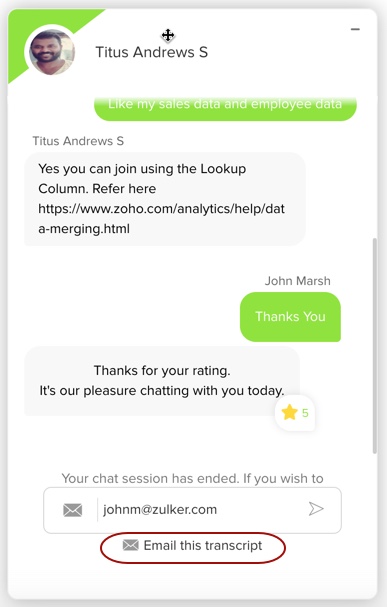
4. Do you offer chat support?
Yes, Zoho Analytics does offer chat support during business hours. Account Administrator of paid accounts and trial accounts can avail this support. This will not be available for free users and shared users.
Follow the below steps to contact support through chat.
- Login to Zoho Analytics.
- By default, the Chat icon will be displayed at the bottom right of the service.
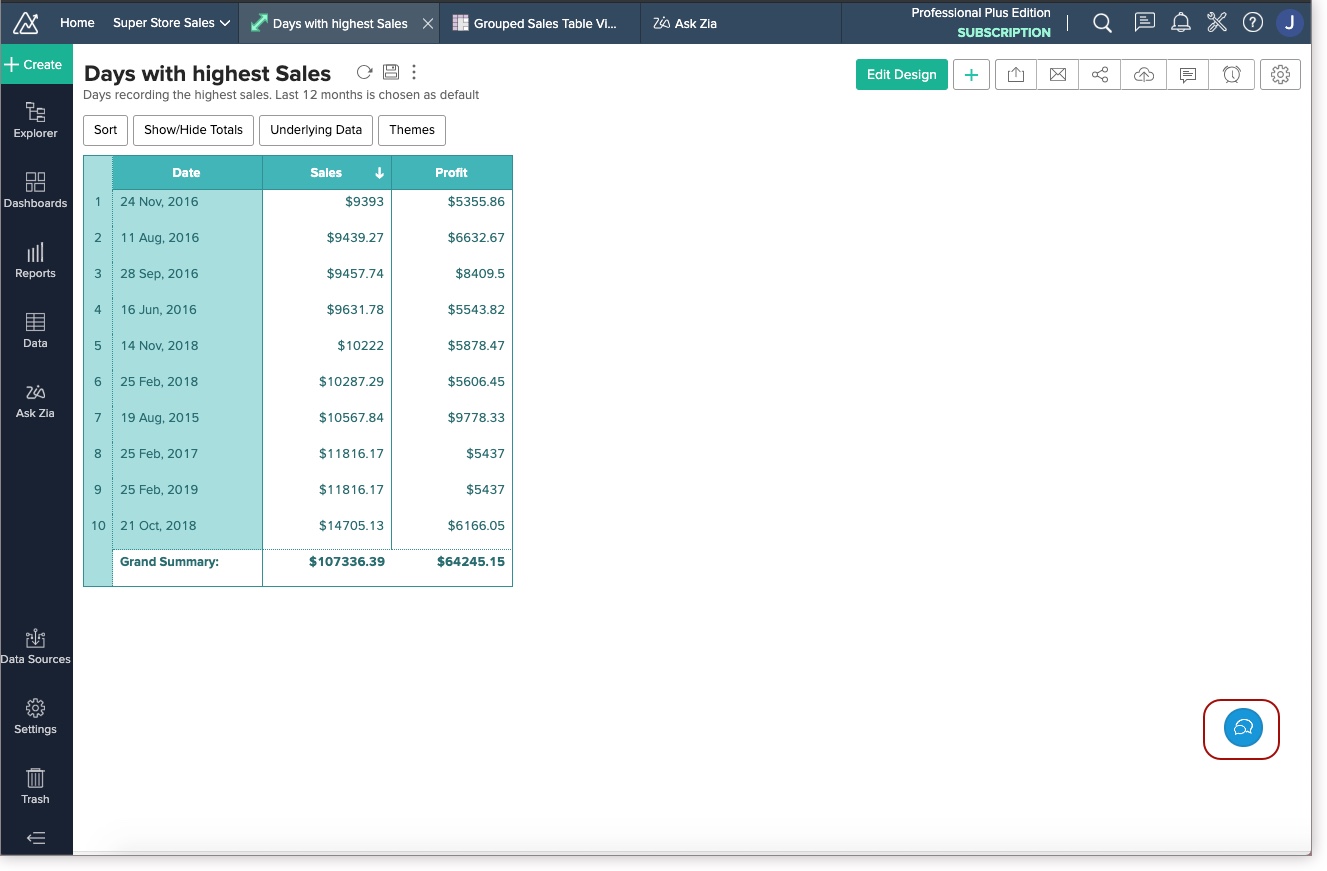
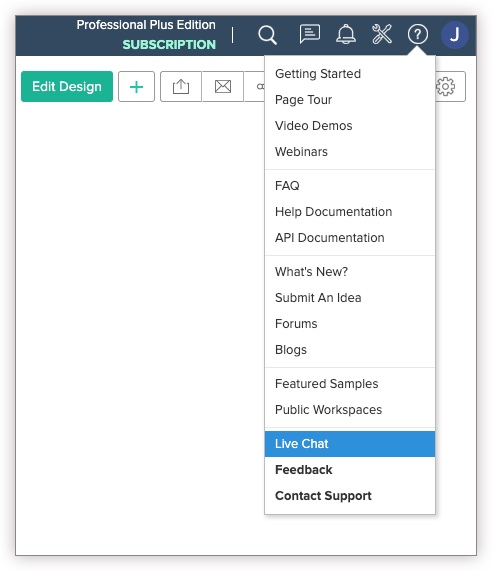
In case you have closed it, you can open the chat again by clicking the Help icon > Live Chat.
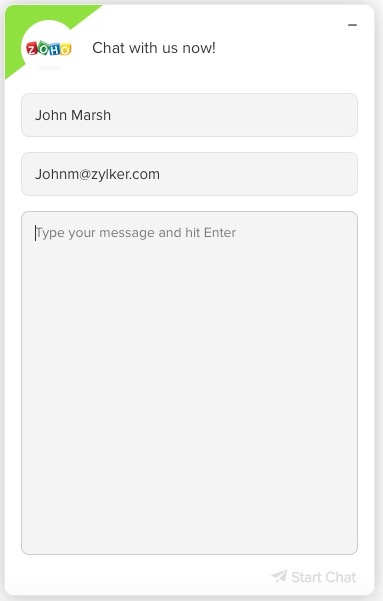
- Click the Chat icon. The Chat window will open.
- Enter your name and email address and click Start Chat. One of our agents will reply.
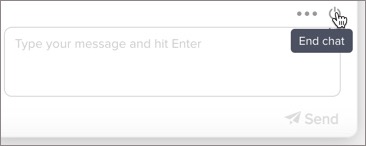
- Once your queries were resolved, click End Chat to close the conversation.
- You can send a copy of the conversation to your email address by clicking Email this transcript.





5. How do I interact with Zoho Analytics user community?
You can interact with Zoho Analytics user community through Zoho Analytics User Forums.
6. How can I get information about new features/announcements?
We will announce about new features in Zoho Analytics regularly in our What's New page and occasionally on important announcements in Zoho Analytics Blog. You will also be getting a notification banner on top of the Zoho Analytics User Interface (when you log in) for important announcements/news.
Others
- Is Zoho Analytics supported on Mobile and Tablet devices?
- What is the difference between Zoho Analytics and Zoho Creator?
- How to choose between Zoho Analytics and Zoho Creator?
1. Is Zoho Analytics supported on Mobile and Tablet devices?
Yes. Zoho Analytics offers mobile optimized apps for iPhones, Android Phones, iPad, and Android Tablets available in the Apple App Store and Google Play Store respectively.
2. What is the difference between Zoho Analytics and Zoho Creator?
The key difference between Zoho Analytics and Zoho Creator is in-depth reporting and analytics vs online custom database application creation.
Zoho Analytics enables you to easily create powerful and sophisticated reports with your data by creating online reporting applications. It enables you to slice & dice your data for in-depth visualization and business intelligence. Zoho Creator enables you to quickly create a powerful online database application to collect data and trigger work flows through forms and scripting.
Zoho Analytics could act as a convenient back-end reporting/analytical service for your application needs. You can get data into Zoho Analytics through manual data entry or bulk load data from files or upload data stored in your local databases (like MS Access, Oracle, SQL Server, MySQL, DB2, PostgreSQL & MS Access) or schedule for periodic upload of data or push data from your application through Web API (HTTP based) for reporting and analysis. Here the crucial difference is that, while Zoho Creator offers a hosted programming environment (with a DB backing), Zoho Analytics offers a powerful reporting layer for your application data.
Zoho Analytics also supports full-fledged relational modeling (similar to relational/analytical databases) for powerful reporting. It currently supports relational modeling functionalities through Lookup columns. With lookup columns you can relate one table with another. It also offers cascade-on-delete functionality whereby when a row in the parent table is deleted, it will automatically delete all the related rows in the child table(s). Click to know more on Zoho Analytics Relational Modeling Capabilities.
The other key difference is that Zoho Analytics embraces SQL, and supports all major dialects of it. This enables users to do sophisticated querying on the data for creating powerful reports. We will flesh out this functionality even further in future updates.
3. How to choose between Zoho Analytics and Zoho Creator?
Please read the FAQ #2 before you read further. If you require a quick application development environment, with forms, scripting, workflows and basic reporting, opt for Zoho Creator. If you require a powerful online reporting and analytics service with an inbuilt analytical database support, opt for Zoho Analytics. Zoho Analytics also supports Web based APIs using which you can build your own forms and push/update/pull data into Zoho Analytics from any of your applications.
Note:
- In case you require any clarifications or assistance in this regard, please feel free to contact us at support@zohoanalytics.com.